

From bilingual tables
to the canvas.
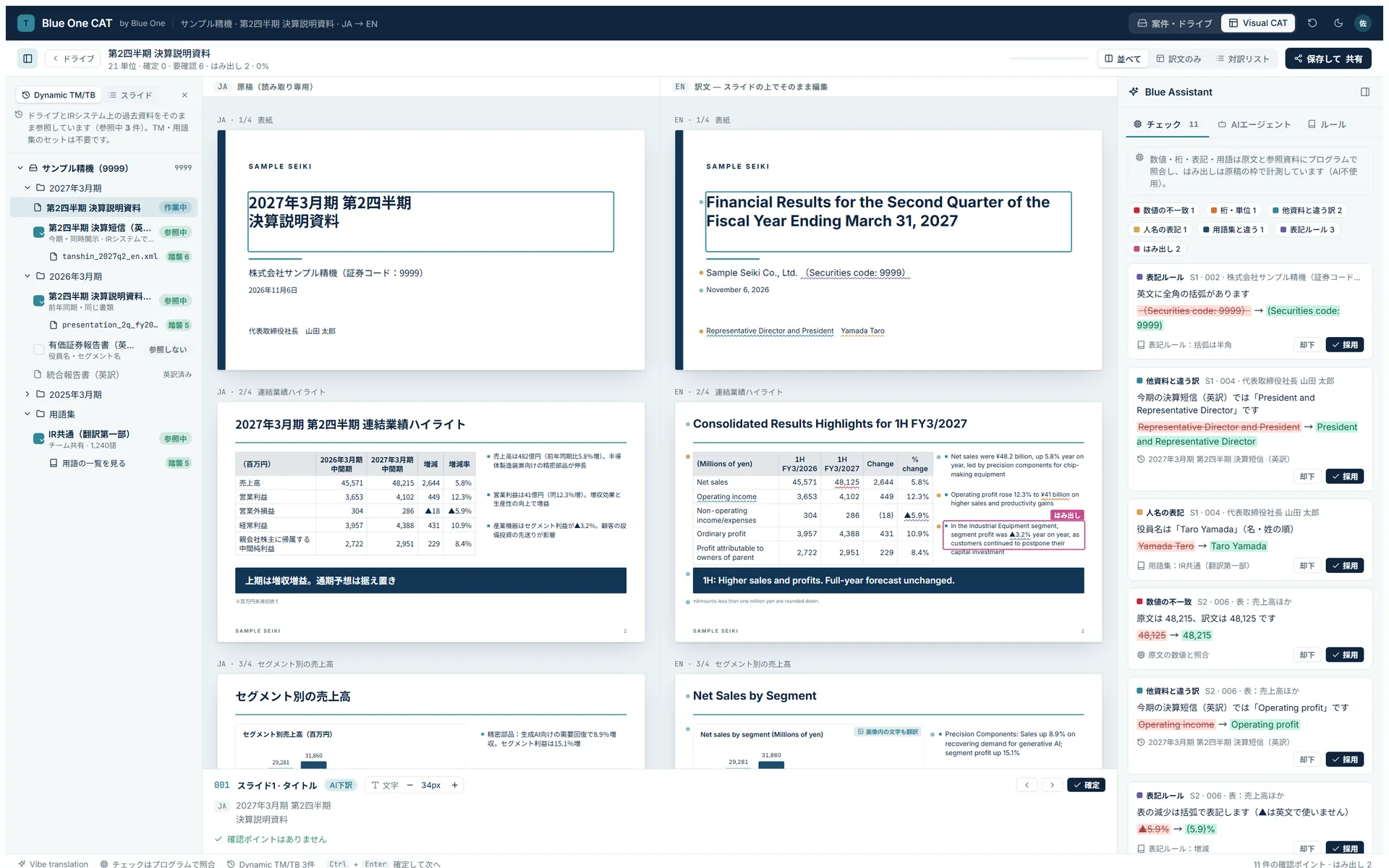
Chop text into segments, slot them into a table, confirm them one sentence at a time. We’ve rebuilt the translation workbench that hasn’t changed in a quarter of a century. Blue One CAT is an AI-agent CAT system for translation companies and in-house translation teams: AI translates on the original layout, and people check and sign off.
Request a demo- Slator “Language AI 50 Under 50” — the only Japanese company selected
- ISO/IEC 27001 (ISMS) certified
In the age of AI,
the workbench is stuck in the past.
Machine translation has given way to generative AI. Yet the screen translators work in has barely changed in 20 years.
Chopped into segments, boxed into tables
Documents are split into segments and translated one sentence at a time in a bilingual table. Context gets lost, and text inside figures, tables, and images never makes it into the table. Drawings go to outside vendors; formatting gets fixed in DTP. You keep hunting for what needs fixing without ever seeing the finished result.
Endless TM and glossary upkeep
You build a translation memory from last year’s documents, register it, and apply every change to the source by hand. Multiple translations pile up for the same source text, and the glossary misses a term if the word form is even slightly different. More time goes into maintaining assets than into translating.
Duplicate files, endless hand-offs
The same file lives in two places: the company drive and the tool. Every step means switching tools and passing files along. At the end, someone checks numbers, units, and names by eye. And the know-how stays with whoever did the work.
The translation workbench, rebuilt from the ground up.
Draft translation, revisions, checks — the AI agent takes them all on. The AI never rewrites your translation on its own; every change is shown as a suggested diff. People decide whether to accept or revert it.
From bilingual tables to the canvas.
Your translation appears right on the original layout. Slides, drawings, tables, even text inside images — fix it all exactly as you see it. And you can switch to a bilingual list view at any time.
Reads the whole document, then translates.
Instead of chopping it into sentences, it translates with the context of the entire document in mind. It also translates text inside images while keeping the layout, so the draft translation is already close to the finished product.
No TMs or glossaries to build.
The AI refers directly to the previous period’s version of the same document and to past deliverables, carrying over their translations and terminology. When the source changes, just point it to the new version. No building or registering translation memories, and no applying changes by hand.
Your files stay where they always are.
It connects directly to your company drive, such as Google Drive or Box: open the files there, translate them, and put them back. The tool never keeps its own copy, so there are no duplicate files or mix-ups, and no extra place outside your company holding your important documents.
Keep your workflow.
Lose the busywork.
Without overhauling how you work today, we move the manual tasks at each step to AI.
| Step | Today | Blue One CAT |
|---|---|---|
| File management | Duplicate files on the company drive and in the tool. Finding the latest version takes effort | Connects directly to your drive, so you always work on the latest version |
| Intake & prep | Clean up files before importing. Figures and images are a separate job | Drop in the source as-is. Images and tables are translated along with it |
| Translation | Set up a TM and glossary per project, then translate one sentence at a time in a bilingual table | Past documents are referenced automatically; fix the translation right on the layout |
| QA | Check terms, numbers, units, and names by eye | Blue Assistant spots inconsistencies and suggests fixes in bulk. People just confirm |
| Formatting & sharing | Translated text runs long and gets fixed in DTP. Work stays siloed with individuals | Output keeps the layout. Save back to the drive and share with your team |
How it differs from legacy CAT tools
| Legacy CAT | Blue One CAT | |
|---|---|---|
| Editor | Segment-based bilingual table. Can’t handle images, figures, or layout | Work on the original layout, with images and tables shown as they are |
| Translation method | Machine translation or generative AI applied segment by segment | Translates with the whole document’s context, keeping the layout |
| Past assets | Register TMs and glossaries and keep maintaining them | References past documents directly. No TM or glossary upkeep |
| File management | Imported into the tool, duplicating the originals | Connects directly to your company storage |
| Human & AI roles | People confirm each sentence; AI suggests translation candidates | The AI agent handles everything from draft to revision; people review and sign off |
Legacy CAT tools have started adding generative AI. But they’re still built around bilingual tables and translation memory.
Adapts to
any kind of translation.
Patent specifications, disclosure documents, manuals, picture books. Configure terminology, style, check items, and display to fit your field and workflow.
- Patents & IP
- Pharma & life sciences
- Manuals & technical docs
- Software & games
- Disclosure & IR
- Finance
- Legal & contracts
- Academic papers
- Marketing & advertising
- Tourism & travel
- Publishing & picture books
- Manga & entertainment
Two parts to pricing:
onboarding support and a monthly fee.
Onboarding support
We work alongside you, from taking stock of your workflow and configuring the system to fit it, to getting it embedded in day-to-day work. Quoted based on duration and team setup.
Monthly fee
A flat rate with a set usage cap. We’ll let you know as you approach the cap, and your work never stops.
Pricing is quoted based on your scale of use.
Because you’re trusted with confidential documents.
ISO/IEC 27001 certified
The international standard for information security. Certificate No. GIJP-2266-IC
Not used for AI training
We never use the data you entrust to us for training.
AI processing by permission only
AI is used only for the processing you allow.
Bring your own API key
You can also use your own AI API keys (BYOK).
Retention & auto-deletion
Set a data retention period, with automatic deletion.
Documents stay in your storage
Work on files right where they sit in your storage. Your current permission settings apply as they are.
Processing location on request
We’ll work with you on procurement requirements such as the processing region.
Frequently asked questions
Yes. Your existing translation memories, glossaries, and past bilingual files can serve as reference material for the AI. There’s no need to keep building and maintaining new ones. We’ll ask about formats during onboarding.
Yes. Start with some teams or projects and migrate gradually while running it alongside your current tool.
Word, PowerPoint, Excel, PDF, and images, exported back in their original format. Ask us about formats from existing systems, such as XML, or about exporting bilingual tables and glossaries.
We aim for near-final quality from the draft translation, but the system is designed on the premise that people make the final call. The AI proposes; people review and confirm.
We quote onboarding support plus a capped monthly fee. We’ll propose a plan after learning about your scale, fields, and usage.
It depends on your fields and scope. In our initial consultation, we’ll propose a schedule up to the start of a trial.
Yes. We are ISO/IEC 27001 (ISMS) certified, and we respond individually to procurement and information-security requirements.
See an AI translation agent
in action.
In a 30-minute online demo, we’ll show you Blue One CAT’s screens and how it works — and hear about your current workflow.
Request a demoNeed a document translated right away? →